Artificial Intelligence
Level Up Your AI Chats: Six Prompt Moves That Wake Your Words Up
Six small prompt shifts turn AI from a dull answer machine into a sharp thinking partner you can use all day, from budgets to bedtime stories.
Khalid Rizvi · January 2026 · 8 mins

Ask a lazy question, and AI will give you a lazy answer.
Ask a sharp, concrete question, and the model suddenly feels alive.
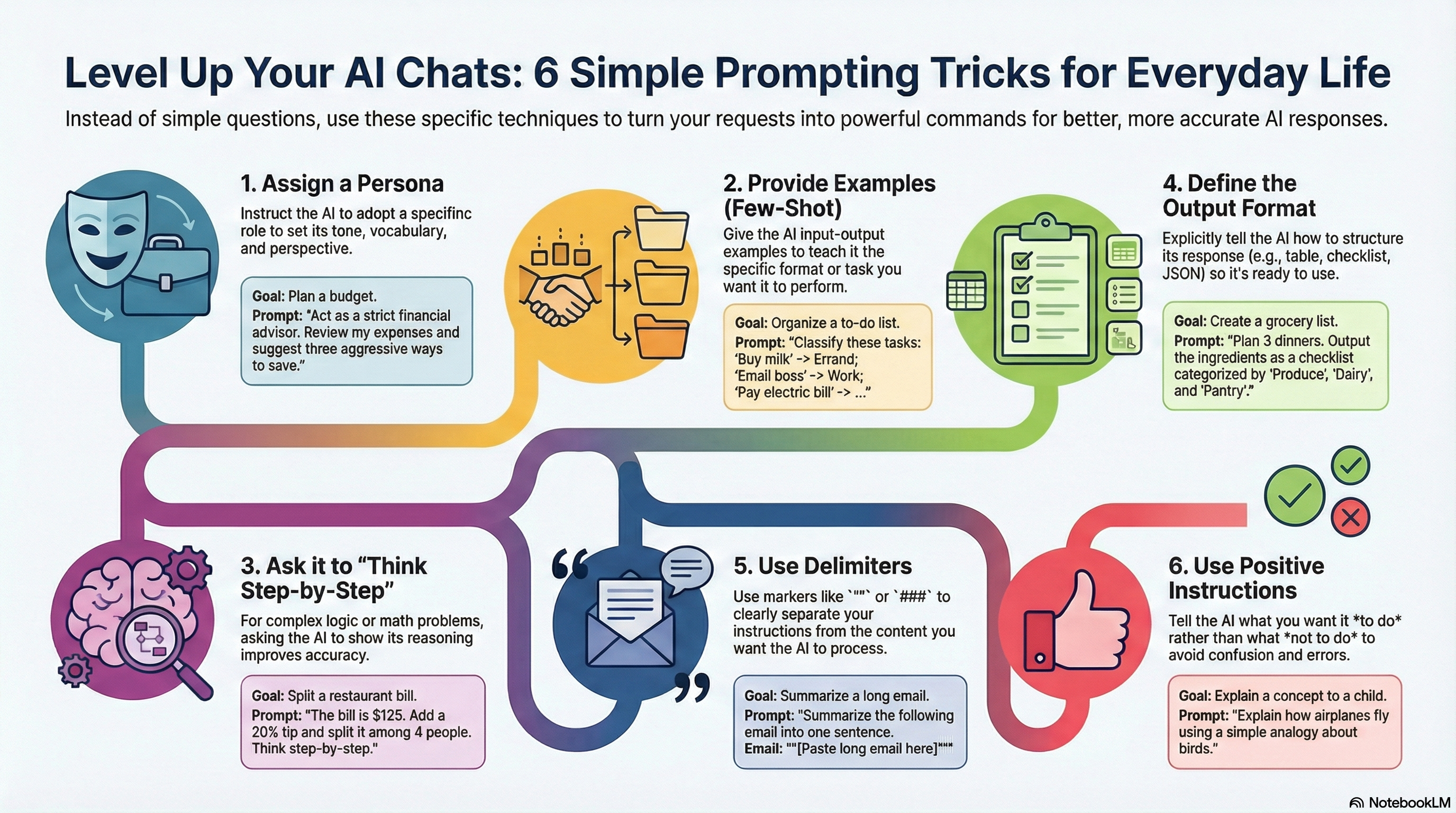
The above infographic captures this shift in six brisk strokes: persona, examples, thinking steps, output format, delimiters, and positive instructions.
They look simple, but used together, they turn your prompts into tools rather than wishes.
1. Assign a Persona
Assigning a persona is the first move that wakes your AI up. When you say, “Act as a strict financial advisor,” you stop talking to a bland, generic assistant and start talking to a character with a job, a temperament, and boundaries. The tone sharpens; the answers grow firmer and more focused, because the model now knows what kind of help you want and what you will tolerate. A persona can be tough and skeptical, gentle and patient, playful and curious, or anything else you need. The trick is to be clear and direct: name the role, hint at the attitude, and let that mask guide the whole conversation.
For example, you might write:
“Act as a meticulous project manager. Review this task list and point out three risks I have missed.”
In one short line, you give the AI a profession, a trait, and a target. It will look for gaps, not just polish your wording.
2. Provide Few‑Shot Examples
Few‑shot examples are the second move, and they are all about teaching by showing instead of telling. Rather than ask the AI to “classify my tasks,” you lay down two or three sample lines where you show exactly how you want things labeled. The model picks up the pattern like a musician hearing a short riff and then improvising in the same key. This is how you fix not just what the AI says, but how it thinks about your data. With a handful of examples, you can train it to mirror your own categories, style, or taste without a single line of code.
For instance, you could say:
“Classify each task as ‘Deep Work’, ‘Shallow Work’, or ‘Admin’.
Examples: ‘Write architecture RFC’ → Deep Work; ‘Reply to team email’ → Shallow Work; ‘File expense report’ → Admin.
Now classify:
– Draft proposal for client X
– Update Jira tickets
– Prepare quarterly budget review.”
The pattern is short, but strong enough to pull the rest of your list into the right buckets.
3. Ask It to Think Step‑by‑Step
Thinking step‑by‑step is the third move, and it gives you the model’s reasoning, not just its verdict. When you add a simple line like “Think step by step,” you nudge the AI to walk through the problem in small, visible hops instead of leaping to the finish. This helps when numbers matter, when logic can go wrong, or when you yourself are not sure of the right path and want to see the scaffolding. The answer becomes a trail you can trace and audit, rather than a black box you must trust blindly.
You might write:
“The bill is 125 dollars. Add a 20 percent tip, then split the total among four people. Show each step in the calculation.”
The model will compute the tip, add it to the bill, then divide by four, laying out each step in plain arithmetic so you can verify it at a glance.
4. Define the Output Format
Defining the output format is the fourth move, and it turns answers into ready‑to‑use artifacts. If you stay vague, the AI will reply in whatever shape feels natural: a rambling paragraph, a loose list, maybe something helpful, maybe not. If you specify “a checklist,” “a Markdown table,” or “valid JSON,” you suddenly have something you can paste into a note, a spreadsheet, or a script without further surgery. Format is not decoration; it is how you carry the response into the next stage of your day.
For a simple but powerful example, try:
“Plan three weeknight dinners that take under 30 minutes. Output a Markdown checklist of ingredients grouped by aisle: ‘Produce’, ‘Dairy’, ‘Pantry’, ‘Frozen’.”
Now the AI is not only thinking about recipes; it is arranging your shopping list in the same way your grocery store arranges its shelves.
5. Use Delimiters to Separate Instructions
Using delimiters is the fifth move, and it is about drawing clean borders inside long prompts. When you paste a big email, article, or transcript, your instructions can easily bleed into the content, and the model may mix them up. Delimiters—triple backticks, quotes, or any clear marker—act like a folder around the text. They say, “This is the thing; everything outside is what to do with it.” The prompt becomes easier for the AI to parse and easier for you to read and modify.
A practical example looks like this:
“Summarize the following article in three bullet points suitable for a non‑technical manager.
Article:[paste article here]”
The AI knows the instructions end before the fence of backticks and that everything inside the fence is material to be summarized, not more commands.
6. Give Positive Instructions
Positive instructions are the sixth move, and they echo a classic rule of good writing: say what you want, not just what you want to avoid. When you tell the AI “Don’t be vague” or “Don’t be too technical,” you leave it with a hole where clarity should be. Replace those with “Be specific” or “Use simple language for a curious ten‑year‑old,” and the model has a clear direction. Positive instructions define a target tone, length, or attitude; they create something, instead of just fencing off errors.
Here is an example that puts this into practice:
“Explain compound interest in one short paragraph using everyday language, as if you are talking to a college freshman who is nervous about money.”
There is no mention of what not to do, yet the picture is vivid, and the model can write toward it with confidence.
Weaving All Six Moves Together
When you combine these six moves, a single prompt becomes a compact script for a very capable partner. You might say, “Act as a strict but encouraging financial advisor,” giving the AI a persona. You show a couple of labeled examples of how you categorize expenses into “Needs,” “Wants,” and “Savings,” teaching it through few‑shot examples. You ask it to “think step by step” as it builds a three‑month budget, then request the result as a Markdown table you can paste into your tracker, which sets the format. You paste your last bank statement between backticks so the model knows exactly what to analyze, and you wrap it all in positive instructions like “Use simple, practical language and highlight three concrete actions I can take this week.” In one carefully shaped prompt, you have woven all six flavors: a clear role, a handful of examples, visible reasoning, structured output, clean boundaries, and a bright, positive aim.